Shopify Product Configurator: Let Shoppers Preview and Personalize Products

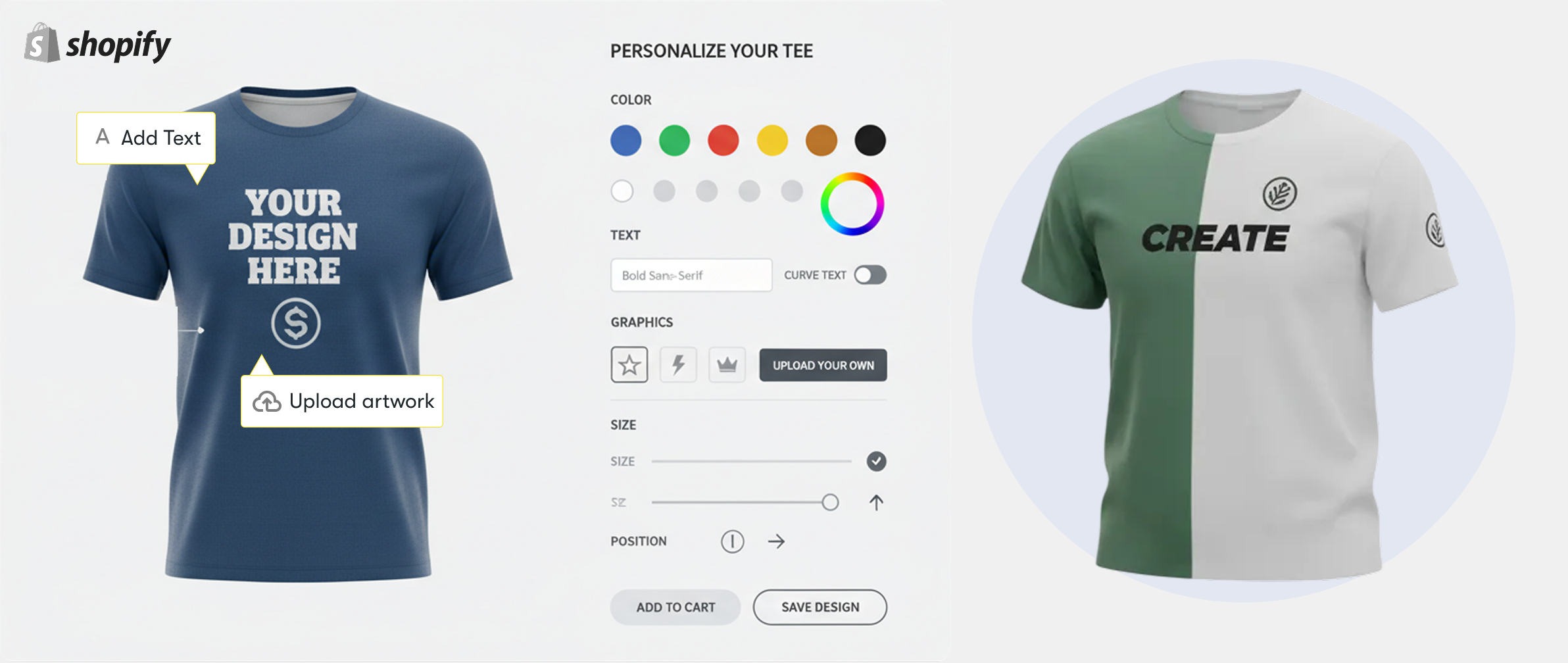
Online shoppers don’t want basic, fixed products anymore. They want options. They want control. That’s why a Shopify product configurator is becoming so popular. It lets customers customize a product before buying, without any confusion. Many Shopify store owners in Texas use configurators to offer better product choices.
As online selling grows in places like Ohio, shoppers now expect a more interactive experience. Even Toronto brands use product configurators to build trust and reduce returns. Buyers feel confident and buy more when they can see their changes live.
What Is a Shopify Product Configurator?
Shopify product configurators make it easy for customers to choose before buying. It feels natural. Like in-store shopping. Variations in color, size, and style are visible immediately. No guessing. No muddle.
Someone in Texas ordering a hoodie knows exactly how it will look. A furniture buyer in Ohio can pick the finish without asking questions. Even stores selling to customers in Ontario use this to keep things clear.
When buyers see the final product clearly, they trust the store more. And when there’s trust, sales follow.
Why Shopify Stores Need a Product Configurator
Most people don’t like taking chances when shopping online. They want to be sure. A product configurator helps with that. It shows customers exactly what they’re choosing, step by step. No confusion. No second thoughts.
1. Better shopping experience : Shopping feels smooth and natural. Customers enjoy picking options their way.
2. Fewer product returns : When buyers see everything clearly, mistakes are reduced. What they order is what they expect.
3. Higher conversion rates : Clear choices keep people on the page. And when things feel right, they click buy.
4. Stronger buyer confidence : Customers trust what they see. That confidence pushes them to complete the purchase.
Types of Shopify Product Configurators
When you sell on Shopify, you want your customers to feel sure about their purchase. A good product configurator does exactly that. Whether you’re a shop owner in Texas, Ohio, or Toronto, using a tool like KR Customizer helps you bridge the gap between a screen and a real product.
Here is how the different types break down:
- Visual Product Configurators : This is all about that "wow" moment. When a customer clicks a new color or swaps a fabric, the picture changes right then and there. It revolutionizes jewelry and clothing. It makes shopping fun rather than tedious. Best of all? Since they see exactly what they're buying, you won't have to deal with nearly as many annoying returns.
- Step-by-Step Configurators : Sometimes, too many options are scary. This configurator guides the buyer through a clear path. First, they pick the base size. Next, they pick the color. Then, they add the extras. Furniture brands in Missouri use this to make buying a complex sofa feel simple and stress-free.
- Text-Based Configurators : You don’t always need flashy graphics. This style has text fields and dropdown menus. Fast, works on all phones, and is cheap to set up. For engraved pens and office equipment, it's best.
- 2D vs 3D Configurators :
2D Configurators : These use high-quality flat images. They are quick to load and very reliable.
3D Configurators: This is the high-end choice. Customers can spin the product around and zoom in on every stitch. Many luxury brands in Ontario use KR Customizer to give their buyers a "retail-store" feeling from their own couch.
The right choice depends on what you sell. If your product is simple, stick to text. For luxury, go 3D. Either way, you help consumers say "yes."
How does a Shopify Product Configurator Works (Step-by-Step)
How do live site customizers work? Quite simple. KR Customizer aims to simplify the shopping experience.
- Customer selects product The customer finds a product they like. They click a "Customize" or "Design Yours" button to open the editor. It’s the first step in making that item feel like its own.
- Mix and Match Options This is where they get creative. They can toggle through different sizes, colors, and materials. Many stores in Texas and Ohio also add "extras," like custom engravings or premium hardware.
- Watch the Live Preview As they click, the image changes instantly. They don’t have to guess what "Navy Blue" looks like next to "Gold." They see it right there on the screen. This visual proof is why Toronto brands love using 3D renders—it looks incredibly real.
- No Price Surprises If a certain upgrade costs more, the price tag updates instantly. Customers know what they're paying for while building. It's honest, open, and prevents last-minute cart abandonment.
- Checkout in a Click Once they’re happy with the look, they hit "Add to Cart." All those custom details are saved automatically and sent to your Shopify dashboard. It’s as easy for you as it is for them.
Key Features to Look for in a Shopify Product Configurator
Choosing a configurator shouldn't be a headache. You just need a tool that works for your customers and doesn't break your site. Whether you’re in Texas or Ontario, look for these non-negotiables in a tool like KR Customizer:
1. Live Previews : People need to see what they’re buying. If they change a color, the picture should change too. Right away.
2. Smart Logic : Don't let customers pick things that don't fit together. This feature hides options that won't work with their current choice. It saves you from awkward "we can't make this" emails later.
3. Live Pricing : No one likes a surprise at checkout. If an add-on costs $10 more, show that price jump immediately. It builds trust.
4. Phone Friendly : Most individuals shop on their phones while out. If buttons are too tiny or site lags, they go.
5. Fast Loading : If it takes lengthy to load, you lose the sale. It must be quick.
6. Simple for You : You have a business to run. You shouldn't need to be a tech genius to change a price or add a new photo.
Benefits of Using a Shopify Product Configurator
Adding a customizer to your Shopify store isn't just a tech upgrade; it’s a massive win for your bottom line. Brands from Texas to Toronto use KR Customizer because it fundamentally changes how people shop.
Here is why it’s worth the investment:
1. Better Engagement : Instead of just scrolling, customers are "building." When people spend time tweaking colors and styles, they feel a sense of ownership. They aren't just looking at a product—they’re creating their product.
2. Higher Order Value : It’s much easier to upsell when the customer can see the value. When they add a premium leather or an extra feature and see the preview improve instantly, they are far more likely to spend the extra cash.
3. Fewer Support Emails : Does this come in blue? or "What does the engraving look like?" Those questions disappear. Since the customer sees the answers in the live preview, your inbox stays clean and your return rates drop.
4. Rock-Solid Trust : Transparency sells. Showing exactly what a custom item looks like—and what it costs—proves you have nothing to hide. It makes your brand look professional and reliable.
Try it NowBest Use Cases for Shopify Product Configurators
Configurators aren't just for show. For the right business, they’re a massive sales tool. If you’re a store owner in Texas, Ohio, or Ontario, using KR Customizer is a total win for these products:
1. Clothes and Hoodies : People love to play designer. Let them swap colors or pick where the logo goes. Customers are more inclined to purchase a garment they "made" themselves.
2. Furniture and Decor : Buying a couch online is scary. Letting someone switch from velvet to leather or change the wood legs makes them feel safe. It takes the guesswork out of big purchases.
3. Jewelry : This is all about the little things. If a customer can pick the birthstone or see their own engraving on a ring, it becomes personal. That emotional spark closes the deal.
4. Print-on-Demand : If you sell mugs or phone cases, you need this. People want to see their names or photos on the item before it ships. It stops them from worrying about mistakes.
5. Tech and Gadgets : Whether it’s custom gaming PCs or colored headphones, tech lovers want to choose their own specs. It turns a standard item into something special.
If you give people the power to choose, they’ll enjoy shopping a lot more. It’s that simple.
Shopify Product Configurator vs Product Variants
Shopify Variants
Think of these as a simple list. You have a shirt. It comes in Small, Medium, and Large. Red, Blue, or Green. That’s it. It’s free and easy, but Shopify cuts you off if you try to get too fancy. Once you have too many combinations, the whole thing breaks.
Which One Should You Actually Use?
Use Variants if : Your product is basic. If you just have a few sizes and colors, don't overcomplicate it. Variants keep your inventory simple and your site fast.
Use a Configurator if : You’re selling something custom. If you’re a high-end brand in Toronto selling modular sofas or custom jewelry, variants will make you lose your mind. You need a configurator so your customers can see their creation updates live. It makes your shop professional and prevents a million "Can I see this in blue?" emails.
Common Mistakes to Avoid When Using a Product Configurator
It's simple to go wrong. Prevent these blunders while putting your shopify product configurator to prevent annoying customers:
1. Going overboard : Don’t offer fifty colors. It just stresses people out. They’ll get overwhelmed and close the tab.
2. Messy pictures : If your photos don’t line up perfectly, the product "jumps" when someone clicks a button. It looks cheap and broken.
3. Hidden fees : Nobody likes a surprise at checkout. If a certain leather costs $20 extra, show that price jump right away.
4. Forgetting about phones : Most of your traffic is on mobile. If the buttons are too small for a thumb, you’re losing money.
5. Being slow : If the page lags while loading images, people are gone. Speed is everything.
6. Keep it simple : If the experience is smooth and fast, people will actually enjoy buying from you.
Get started for free
Play around with Customizer and set up your docs for free. Add your team and pay when you're ready.
How a Shopify Product Configurator Helps Increase Sales
Adding a customizer isn't just a fancy trick—it actually brings in more cash. When people can build their own product, they stop being "shoppers" and start being "creators." They spend more time on your site and feel a real connection to what they made. That means they’re much more likely to hit the buy button.
It also makes upselling effortless. If they see a premium upgrade that looks amazing in the live preview, they’ll happily pay the extra $20. Plus, since they see exactly what they're getting, you’ll get way fewer "it's not what I expected" returns.
Wrapping Up
Is it worth the money? If you sell anything custom, the answer is a big yes. It doesn't matter if you're a small shop in Texas or a big brand in Toronto. People love making things their own. It turns a boring click into a fun experience.
You’ll see bigger orders and fewer "is this what it looks like?" emails. It makes your shop look professional and high-end. When customers build it themselves, they trust the product more. They aren't guessing anymore; they’re seeing.
Ready to try? Experience building your own product with a KR Customizer demo.


FAQ: Shopify Product Configurator
The Shopify product configurator should not slow down your site. Good apps like KR Customizer do the heavy lifting on their own servers. Just don’t upload giant, unoptimized photos. Keep them small so the page stays fast.
Nope. If you can use Facebook or Shopify, you’re fine. It’s mostly just clicking buttons and dragging files in Shopify product configurator. You only need a pro for really weird, custom stuff.
Absolutely. If a customer picks the "Pro" version in Shopify product configurator, the price updates right then and there. It’s the easiest way to make more money per sale.
It has to. Most people shop on their phones now in Missouri. A good Shopify product configurator will shrink down and work perfectly for someone using their thumb on a bus.
Probably not. Most Shopify product configurator in Ontario are built to play nice with standard Shopify themes. It usually just takes a few clicks to get everything synced up.